
 Progressify
 Generatify
 Lightify
 Crownify
 Snapshotify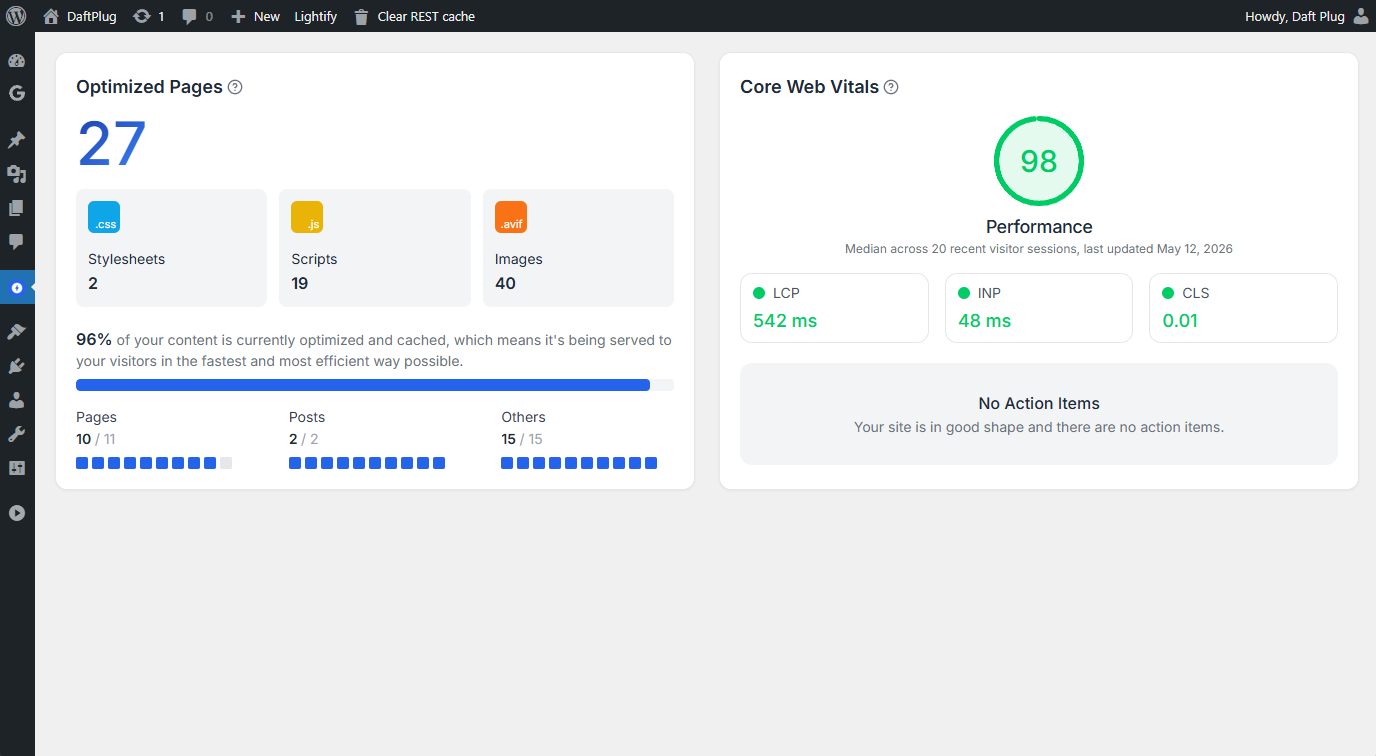
The four things it does
Caches pages
A finished page is written to disk and served directly, so PHP and the database are skipped entirely on the next visit.
Shrinks assets
Minifies HTML, CSS, and JavaScript, removes CSS the page never uses, defers and delays scripts, and self-hosts external files.
Fixes media
Converts images to WebP, lazy-loads what is below the fold, preloads the one image that is not, and replaces YouTube embeds with a thumbnail.
Loads ahead
Prefetches links the visitor is about to click, so the next page is already there.
How caching works here
The page cache has three serving levels, and which one you get depends on your server rather than your settings.1
Rewrite rules, on Apache
.htaccess rules serve the cached file before WordPress loads at all. Fastest, because no PHP runs.2
A drop-in, everywhere else
An
advanced-cache.php drop-in serves the cached file very early in WordPress, before plugins and the theme load.3
Output buffering, as a fallback
WordPress loads normally and Lightify serves the cached HTML from a buffer.
Measuring the result
The overview page reports a performance score built from timings collected from your actual visitors on your cached homepage, weighted the way Lighthouse weights them.These are field measurements, not a lab test. The collector is injected only into the cached copy of your homepage, so the first uncached visitor is never measured and the numbers reflect what people actually experienced. That also means the score needs traffic before it means anything.
How the plugin is organized
Lightify adds a top-level Lightify menu with two pages.1
Overview
Performance score, Core Web Vitals over time, and which pages and assets have been optimized.
2
Settings
Six tabs: Cache, Asset Optimizations, Media Optimizations, Network Improvements, Bloat Removal, and Notifications.
Install Lightify
Requirements, installation, and license activation.