
 Progressify
 Generatify
 Lightify
 Crownify
 Snapshotify
What a PWA gives your visitors
Installable
Your site gets an icon on the home screen or desktop and opens in its own window without browser chrome.
Works offline
Pages the visitor already saw stay readable without a connection, and a fallback page covers the rest.
Re-engageable
Push notifications reach subscribers even when your site is closed.
App-like
Tab bars, pull-to-refresh, dark mode, page transitions, and haptic feedback behave the way native apps do.
How the plugin is organized
Progressify adds a top-level Progressify menu in WordPress with two pages.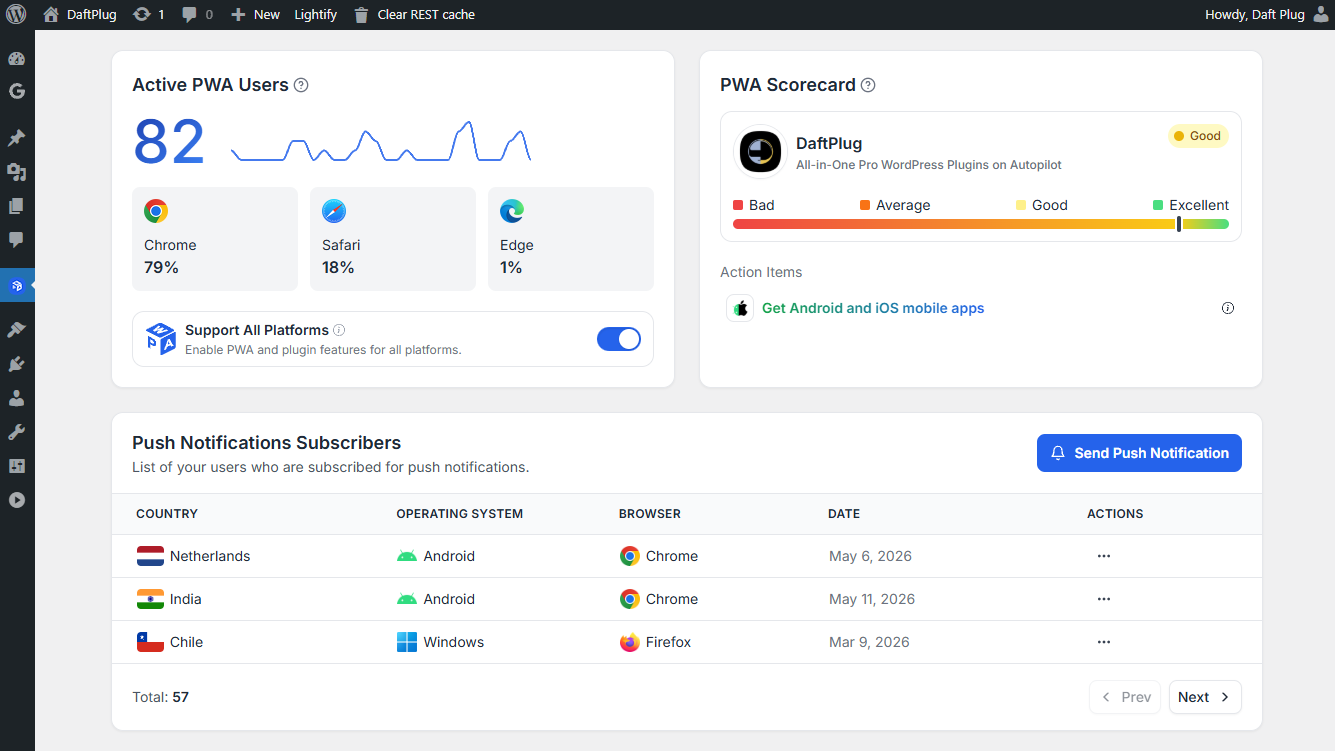
1
Overview
Install and usage analytics, the PWA scorecard that tells you what is still missing, your push subscriber list, and the form for sending a notification.
2
Settings
Seven tabs, each covering one area of the PWA. Every tab is documented in this section.
General
Which platforms the plugin applies to.
Web app manifest
App name, icon, display mode, colors, shortcuts.
Installation
Prompts, install page, button, URL, and QR code.
Offline usage
Caching strategy, fallback page, offline forms.
UI components
Tab bar, dark mode, refresh gestures, loaders.
App capabilities
Page transitions, file and share handlers, background sync.
Push notifications
Subscription controls, automations, delivery settings.
Free and Pro
Exactly which settings each version unlocks.
Before you start
Progressify needs HTTPS. Browsers only register a service worker on a secure origin, so install prompts, offline caching, and push notifications will not work over plain HTTP.localhost is exempt, which is why the plugin behaves differently on a local development site than on a staging domain.
Install Progressify
Requirements, installation, and activation.